> ## Documentation Index
> Fetch the complete documentation index at: https://docs.aion.to/llms.txt
> Use this file to discover all available pages before exploring further.
# Model Service
> Call supported language models through Aion and track their usage in one catalog.
**Model Service** provides one Aion-managed interface for calling supported language models. It centralizes model
discovery, authentication, permission checks, credit usage, and request attribution without requiring each
application to manage a separate provider connection.
Open **Resources > Models** to browse the current catalog. Each entry has an exact model ID, such as a
provider-prefixed ID, that you pass to the API or an Aion SDK adapter.
## Before you begin
You need:
* an active Aion organization with Model Service access;
* enough Aion credits for the request.
## Authentication
Choose credentials based on where the caller runs:
| Caller | Credential | How it is provided |
| ---------------------------- | ----------------------------------------- | ----------------------------------------- |
| Script, API client, or Codex | `AION_API_KEY` | Create a personal API key in Aion. |
| Remote Deployment | `AION_CLIENT_ID` and `AION_CLIENT_SECRET` | Copy the values Aion displays once. |
| GitHub Deployment | `AION_CLIENT_ID` and `AION_CLIENT_SECRET` | Aion injects the values into the runtime. |
### Personal API key
Use a personal API key when calling the Model Service directly from a script, API client, or Codex. Open
**Settings > Personal > API Keys**, create a key, and store it in your shell:
```bash theme={null}
export AION_API_KEY="your-api-key"
```
Send the key as a bearer token. It acts as your user in the active organization and is limited by your permissions.
See [API Keys](/docs/other/api-keys) for creation and security guidance.
### Deployment client credentials
Aion deployments use `AION_CLIENT_ID` and `AION_CLIENT_SECRET`:
* **Remote Deployment:** Aion displays both values after you create the deployment. Copy them immediately and add
them to the runtime's environment. The client secret is shown only once and cannot be retrieved later.
* **GitHub Deployment:** Aion injects both values into the hosted runtime environment automatically.
The Aion SDK reads these variables, exchanges them for a short-lived Aion token, and refreshes the token as needed.
SDK model adapters use that token automatically; do not send the raw client ID or secret to a model endpoint.
### Permissions and attribution
Both authentication paths require `model.execute` in the organization. A personal API key acts as its user. A
deployment call is authorized and attributed through the runtime's
[Daemon Identity](/docs/concepts/identities#daemon-identities).
Before sending work to a model, Aion also checks the organization's credit policy. Usage records contain the model,
token counts, Aion credits, result status, and responsible user or Identity. They do not contain the prompt or
generated response.
A failed or cancelled request can still use credits when the model reports consumed work.
## Usage
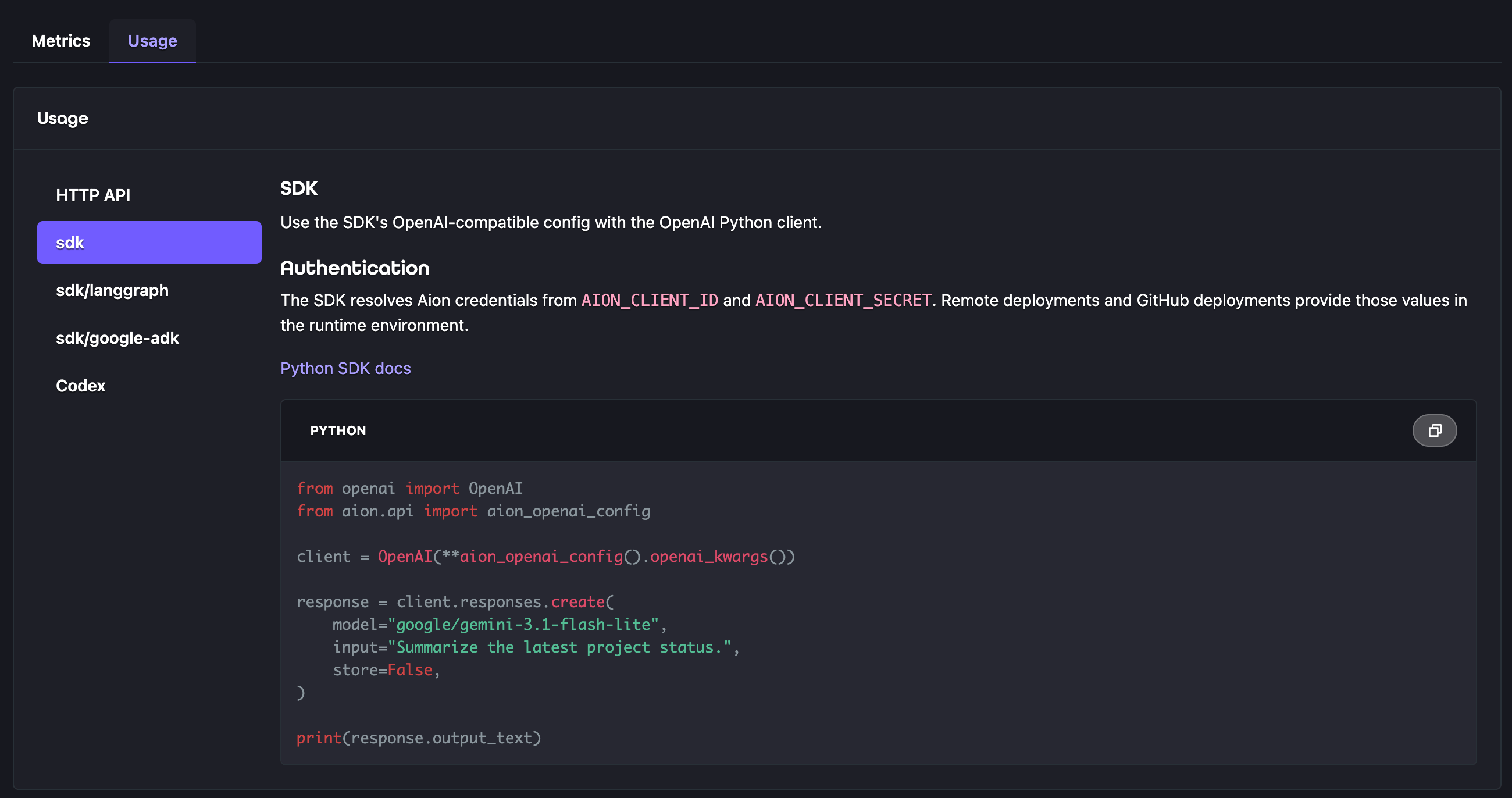
Open **Resources > Models**, select a model, and open **Usage** to see copyable examples populated with that model's
exact ID.
### Choose a client
| Option | Use it for | Authentication |
| ---------- | ---------------------------------------------------------- | ----------------------------- |
| HTTP API | Scripts and OpenAI-compatible Responses clients. | Personal API key |
| Python SDK | OpenAI-compatible clients running in an Aion deployment. | Deployment client credentials |
| LangGraph | LangGraph applications using an Aion-managed chat model. | Deployment client credentials |
| Google ADK | Google ADK applications using an Aion-managed model. | Deployment client credentials |
| Codex | Configuring Aion as a Responses-compatible model provider. | Personal API key |
 ### Make an HTTP request
Copy a model ID from **Resources > Models**. Model availability and pricing can change, so use an ID from the live
catalog instead of guessing a provider model name.
Replace `PASTE_MODEL_ID_HERE` with the model ID you copied:
```bash theme={null}
curl https://api.aion.to/v1/responses \
-H "Authorization: Bearer $AION_API_KEY" \
-H "Content-Type: application/json" \
-d '{
"model": "PASTE_MODEL_ID_HERE",
"store": false,
"input": [
{
"role": "user",
"content": "Summarize the latest project status."
}
]
}'
```
A successful request returns an OpenAI-compatible Response object containing the model output and token usage. Aion
does not retain the response for later retrieval.
### Use an SDK adapter
The Python SDK example uses `aion_openai_config()` with the OpenAI client. Framework adapters provide model objects
configured for the same service:
```python theme={null}
from openai import OpenAI
from aion.api import aion_openai_config
client = OpenAI(**aion_openai_config().openai_kwargs())
response = client.responses.create(
model="PASTE_MODEL_ID_HERE",
input="Summarize the latest project status.",
store=False,
)
print(response.output_text)
```
* [LangGraph Model Service](/sdk/langgraph/api/models) uses `aion_chat_model()`.
* [Google ADK Model Service](/sdk/google-adk/api/models) uses `aion_lite_llm()`.
* [`aion-api-client`](/sdk/python/packages/aion-api-client) provides shared authentication and Model Service
configuration.
For a configurable application, an `llm` field in
[`aion.yaml`](/sdk/python/configuration/aion-yaml#llm-fields) lets a deployer choose a model from the live catalog.
Application code passes that selected model ID to its SDK adapter.
### Configure Codex
Set `AION_API_KEY`, then add Aion as a provider in your Codex home configuration:
```toml theme={null}
# $CODEX_HOME/config.toml
model = "PASTE_MODEL_ID_HERE"
model_provider = "aion"
[model_providers.aion]
name = "Aion Model Service"
base_url = "https://api.aion.to/v1"
env_key = "AION_API_KEY"
wire_api = "responses"
```
## Browse model details and pricing
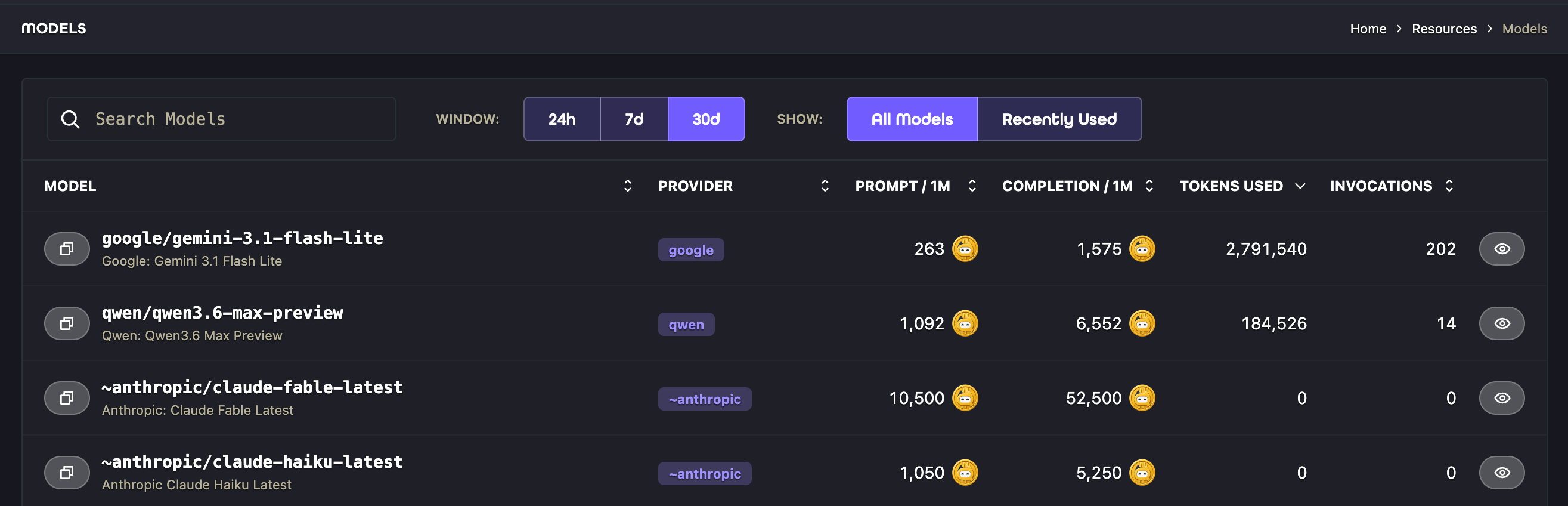
The Models list shows each model's provider, prompt and completion price per million tokens, recent token usage, and
invocation count. Search the catalog or filter it to models used recently.
### Make an HTTP request
Copy a model ID from **Resources > Models**. Model availability and pricing can change, so use an ID from the live
catalog instead of guessing a provider model name.
Replace `PASTE_MODEL_ID_HERE` with the model ID you copied:
```bash theme={null}
curl https://api.aion.to/v1/responses \
-H "Authorization: Bearer $AION_API_KEY" \
-H "Content-Type: application/json" \
-d '{
"model": "PASTE_MODEL_ID_HERE",
"store": false,
"input": [
{
"role": "user",
"content": "Summarize the latest project status."
}
]
}'
```
A successful request returns an OpenAI-compatible Response object containing the model output and token usage. Aion
does not retain the response for later retrieval.
### Use an SDK adapter
The Python SDK example uses `aion_openai_config()` with the OpenAI client. Framework adapters provide model objects
configured for the same service:
```python theme={null}
from openai import OpenAI
from aion.api import aion_openai_config
client = OpenAI(**aion_openai_config().openai_kwargs())
response = client.responses.create(
model="PASTE_MODEL_ID_HERE",
input="Summarize the latest project status.",
store=False,
)
print(response.output_text)
```
* [LangGraph Model Service](/sdk/langgraph/api/models) uses `aion_chat_model()`.
* [Google ADK Model Service](/sdk/google-adk/api/models) uses `aion_lite_llm()`.
* [`aion-api-client`](/sdk/python/packages/aion-api-client) provides shared authentication and Model Service
configuration.
For a configurable application, an `llm` field in
[`aion.yaml`](/sdk/python/configuration/aion-yaml#llm-fields) lets a deployer choose a model from the live catalog.
Application code passes that selected model ID to its SDK adapter.
### Configure Codex
Set `AION_API_KEY`, then add Aion as a provider in your Codex home configuration:
```toml theme={null}
# $CODEX_HOME/config.toml
model = "PASTE_MODEL_ID_HERE"
model_provider = "aion"
[model_providers.aion]
name = "Aion Model Service"
base_url = "https://api.aion.to/v1"
env_key = "AION_API_KEY"
wire_api = "responses"
```
## Browse model details and pricing
The Models list shows each model's provider, prompt and completion price per million tokens, recent token usage, and
invocation count. Search the catalog or filter it to models used recently.
 Select a model to review its supported input and output modalities, context length, maximum completion size,
knowledge cutoff, pricing, and other catalog metadata. The catalog is the source of truth for availability. Aion does
not expose controls for enabling a model or configuring provider credentials on this page.
## Monitor usage and cost
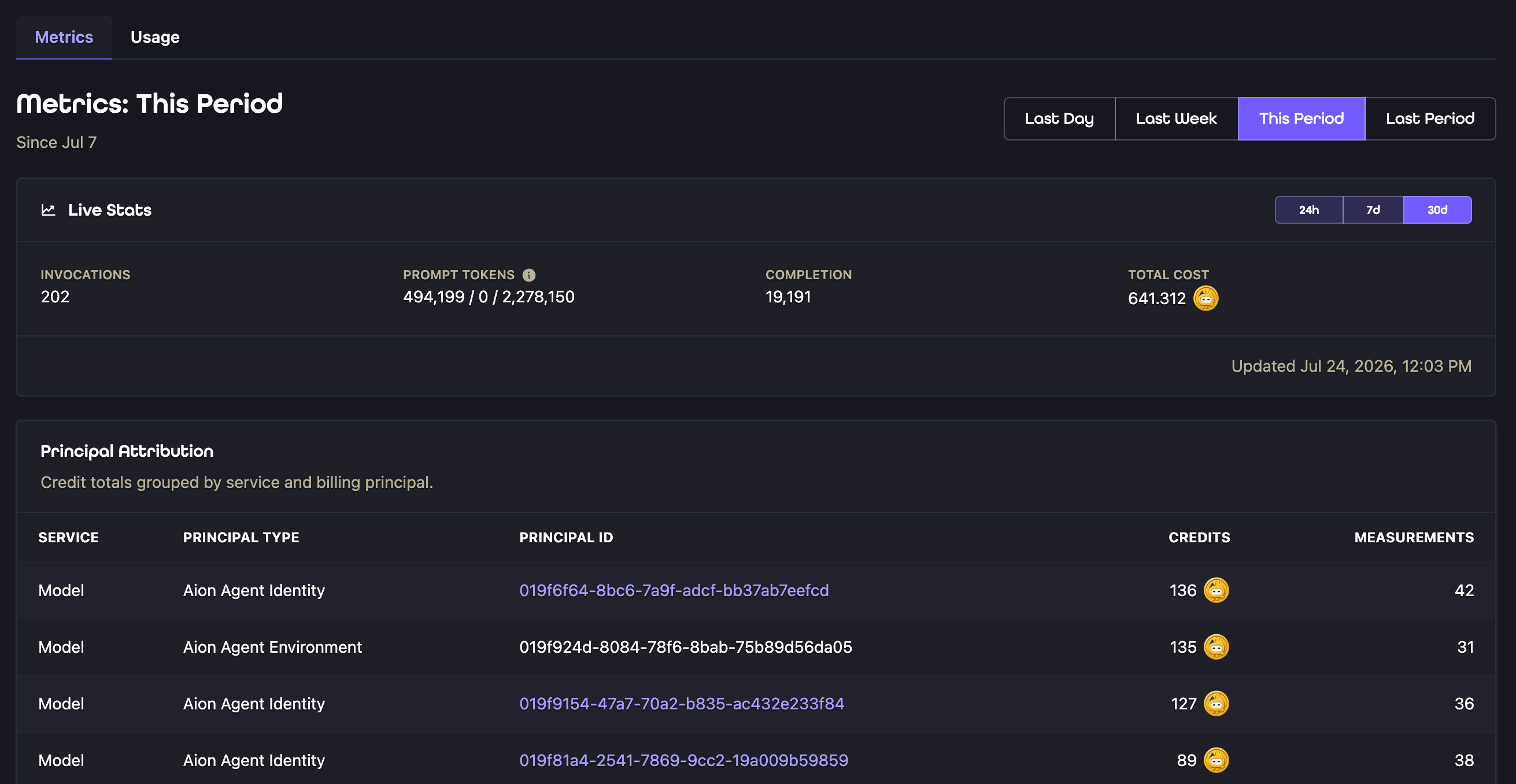
Select a model and open **Metrics** to inspect **Invocations**, **Prompt Tokens**, **Completion**, **Total Cost**, and
**Principal Attribution**. Use the **24h**, **7d**, and **30d** controls to change the reporting window.
Select a model to review its supported input and output modalities, context length, maximum completion size,
knowledge cutoff, pricing, and other catalog metadata. The catalog is the source of truth for availability. Aion does
not expose controls for enabling a model or configuring provider credentials on this page.
## Monitor usage and cost
Select a model and open **Metrics** to inspect **Invocations**, **Prompt Tokens**, **Completion**, **Total Cost**, and
**Principal Attribution**. Use the **24h**, **7d**, and **30d** controls to change the reporting window.
 ## API behavior
| Endpoint | Purpose |
| --------------------------- | ------------------------------------------------- |
| `GET /v1/models` | List the current text-producing model catalog. |
| `GET /v1/models/{model}` | Retrieve one catalog entry by its exact model ID. |
| `POST /v1/responses` | Create a stateless OpenAI-compatible Response. |
| `POST /v1/chat/completions` | Create a chat completion. |
Use `stream: true` or send `Accept: text/event-stream` to stream either creation endpoint. The Responses endpoint
emits named events such as `response.output_text.delta` and `response.completed`. Chat Completions emits data frames
and ends with `[DONE]`.
The Responses endpoint is intentionally stateless. Set `store` to `false`, include the full conversation context in
each request, and do not send stateful fields such as `previous_response_id`, `conversation`, or
`background: true`.
## Troubleshoot a request
| Error code | What to check |
| ------------------------------- | --------------------------------------------------------------------- |
| `model_not_found` | Copy the exact model ID from **Resources > Models**. |
| `model_not_supported` | Choose a text-producing model supported by the requested endpoint. |
| `model_authorization_denied` | Confirm that the user or runtime Identity has `model.execute`. |
| `response_state_not_supported` | Remove stateful Responses fields and set `store` to `false`. |
| `insufficient_credits` | Review the organization's available Aion credits. |
| `billing_organization_required` | Select an active organization or use runtime credentials tied to one. |
| `credit_policy_suspended` | Ask an organization administrator to review the credit policy. |
## What to do next
* Define an [`llm` configuration field](/sdk/python/configuration/aion-yaml#llm-fields) when deployers should select
the model used by an application.
* Use the [LangGraph model adapter](/sdk/langgraph/api/models) in a LangGraph application.
* Use the [Google ADK model adapter](/sdk/google-adk/api/models) in a Google ADK application.
* Review [Identities](/docs/concepts/identities) to understand runtime permissions and usage attribution.
## API behavior
| Endpoint | Purpose |
| --------------------------- | ------------------------------------------------- |
| `GET /v1/models` | List the current text-producing model catalog. |
| `GET /v1/models/{model}` | Retrieve one catalog entry by its exact model ID. |
| `POST /v1/responses` | Create a stateless OpenAI-compatible Response. |
| `POST /v1/chat/completions` | Create a chat completion. |
Use `stream: true` or send `Accept: text/event-stream` to stream either creation endpoint. The Responses endpoint
emits named events such as `response.output_text.delta` and `response.completed`. Chat Completions emits data frames
and ends with `[DONE]`.
The Responses endpoint is intentionally stateless. Set `store` to `false`, include the full conversation context in
each request, and do not send stateful fields such as `previous_response_id`, `conversation`, or
`background: true`.
## Troubleshoot a request
| Error code | What to check |
| ------------------------------- | --------------------------------------------------------------------- |
| `model_not_found` | Copy the exact model ID from **Resources > Models**. |
| `model_not_supported` | Choose a text-producing model supported by the requested endpoint. |
| `model_authorization_denied` | Confirm that the user or runtime Identity has `model.execute`. |
| `response_state_not_supported` | Remove stateful Responses fields and set `store` to `false`. |
| `insufficient_credits` | Review the organization's available Aion credits. |
| `billing_organization_required` | Select an active organization or use runtime credentials tied to one. |
| `credit_policy_suspended` | Ask an organization administrator to review the credit policy. |
## What to do next
* Define an [`llm` configuration field](/sdk/python/configuration/aion-yaml#llm-fields) when deployers should select
the model used by an application.
* Use the [LangGraph model adapter](/sdk/langgraph/api/models) in a LangGraph application.
* Use the [Google ADK model adapter](/sdk/google-adk/api/models) in a Google ADK application.
* Review [Identities](/docs/concepts/identities) to understand runtime permissions and usage attribution.