

Aion-managed Slack app provisioning is not yet available. Use the customer-managed Slack app setup described below.
Overview
An active Slack Distribution provides two complementary paths:- Slack events: Slack sends message callbacks and optional reaction callbacks through the Events API. Aion validates each eligible event and sends it through the connected Sequence. Membership and app-status callbacks keep the Slack connection current without starting application work.
- Slack tools: Ions in the Sequence can use the
mcp.slackserver to inspect conversations, read recent history, send messages, open direct messages, and manage reactions.
How Slack accounts relate to an Aion
Four pieces work together:
The Aion Identity and Slack Bot serve different purposes. The Aion Identity defines the application boundary. The
Slack Bot supplies the external account and profile that people see in Slack. Set its app name, display name,
description, color, and icon during Slack setup.
Each Slack Bot can connect to one workspace at a time. Reauthorizing the same workspace updates that connection, while
authorizing a different workspace is rejected. A Slack Connect channel does not require another workspace connection.
Default request loop
Aion acknowledges an accepted callback before the Sequence finishes, so Slack does not wait for the application to complete its work. Aion delivers the response asynchronously. The result is a normal Slack conversation: a direct message enters through the Distribution and the Sequence returns the bot’s reply.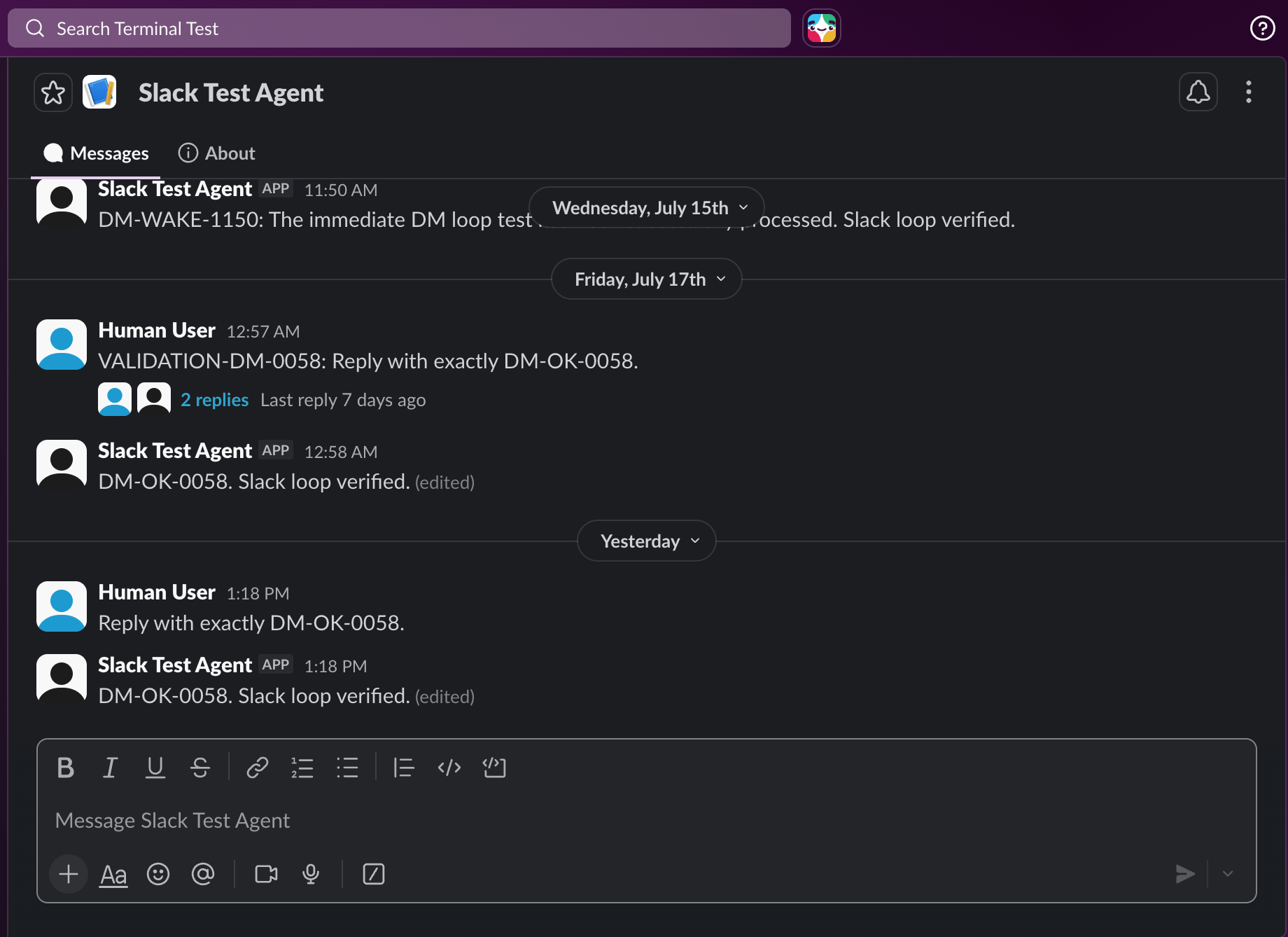
Configuration
Before you begin
You need:- an Aion organization and a Project containing a Slack Distribution Ion;
- permission to add integrations to that Aion organization;
- permission to create or install an app in the target Slack workspace; and
- a Slack workspace administrator when app approval is required.
Create a customer-managed Slack bot
Use customer-managed setup when your organization should own the Slack app and its credentials.- Open Integrations, select Slack, then select Add Slack account (
+). - Choose Customer-managed Slack app in the Setup Slack Bot dialog.
- Enter the bot display name and Slack app name. Optionally add a description, icon URL, and background color.
- Select Continue, then select Create App in Slack. Choose the intended workspace and review the generated manifest before creating the app.
- Return to Aion, confirm that the app was created, and enter its App ID, Client ID, Client Secret, and Signing Secret. Treat these values as secrets.
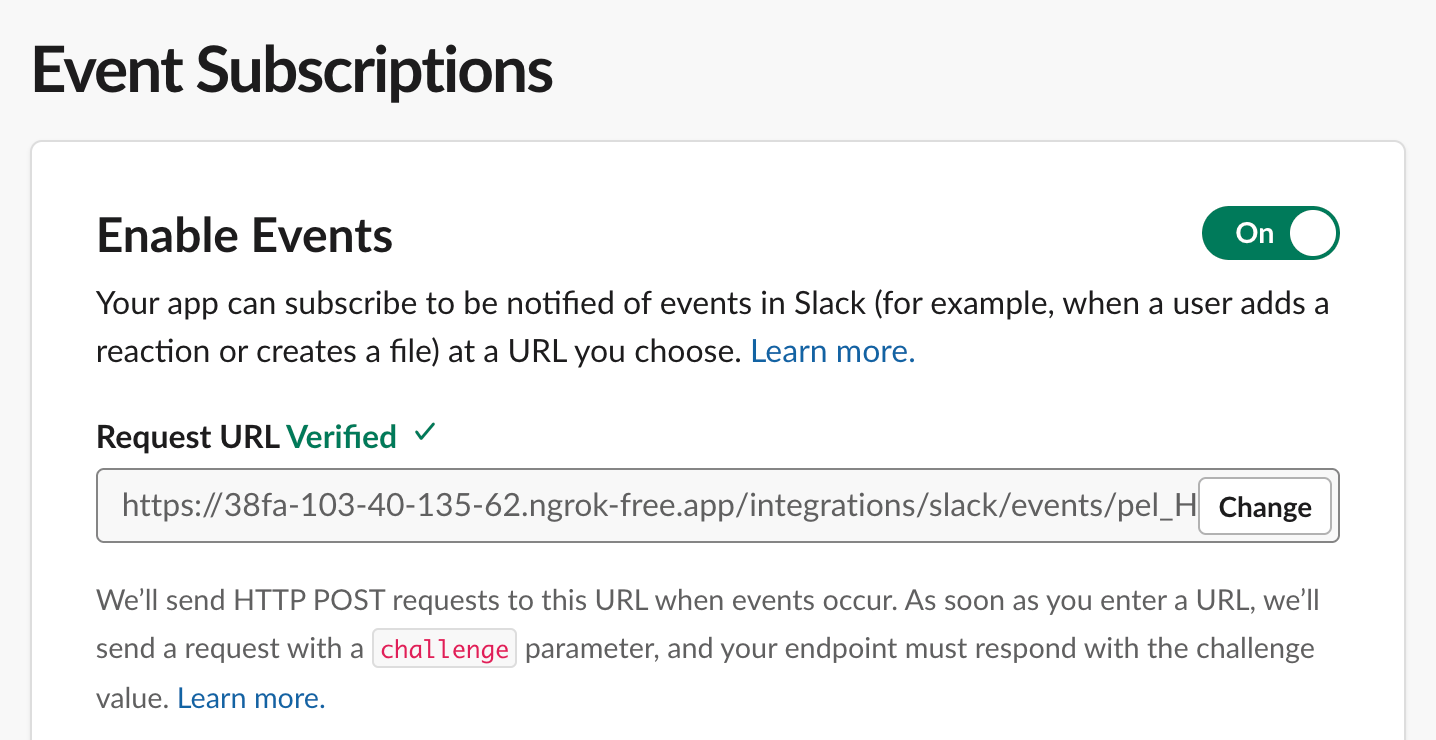
- Select Open Event Subscriptions in Slack, then select Retry beside the preconfigured Request URL. Wait for Slack to mark it as verified, confirm that state in Aion, then continue. If you supplied an icon URL, set or confirm the app icon in Slack before confirming this step.
- Complete Slack authorization in the window that opens. Review the requested bot grants and approve the installation. If Slack requires admin approval, close the Aion dialog and resume the pending setup later.
- Return to Integrations > Slack and verify that the Slack bot appears under Identities.
Provider permissions
Slack grants permissions to the installed bot. Aion records the scopes Slack actually grants and shows requested permissions separately from their current grant state. New app manifests and installations request the scopes below. An existing installation keeps its current grants until you reauthorize it.
The generated app configuration can also declare the app-level
authorizations:read scope. When an app-level token
is configured, Aion uses it to reconcile authorization records for shared Slack events. It is not a workspace bot
OAuth grant, and its absence does not disable baseline Slack messages.
If a requested scope is missing, update the customer-managed app configuration when necessary, then reauthorize the
workspace installation. Missing optional access degrades only the associated feature.
In particular, missing files:read omits native audio files and transcripts while authored text continues. If an
event contains only an inaccessible audio clip, its event data and failure notice can still start eligible agent work.
Aion-managed provisioning
Aion-managed Slack app provisioning is not currently available. With customer-managed setup, your organization owns the Slack app and applies later Slack configuration changes.Assign the Slack bot to a Distribution
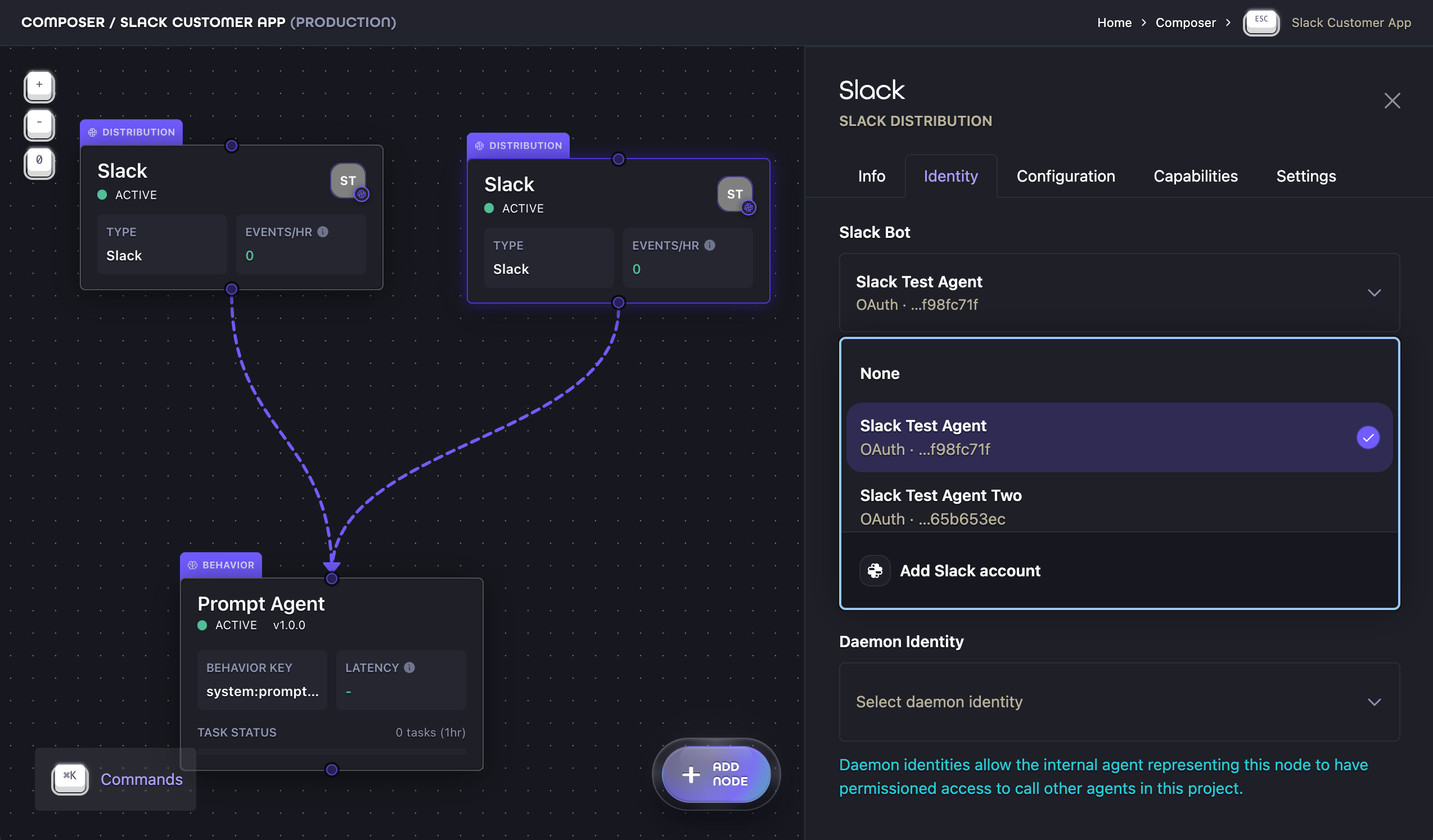
Completing Slack setup does not automatically bind the bot to a Project or Distribution.- Open the Project in Composer.
- Select the Slack Distribution Ion and open its Identity tab.
- Select the completed bot under Slack Bot.
- To make this endpoint part of an Aion, select its Principal Identity.
- Sync the Project changes.
Configure Slack behavior
Open the Distribution Ion’s Configuration tab to control how Slack messages enter and leave the Sequence.
Baseline messages from joined public channels, invited private channels, one-to-one direct messages, multiparty direct
messages, and threads do not require an Event Policy selection. Enabling reactions can require additional OAuth grants
and reauthorization.
The available reply modes preserve the inbound context, create a thread reply, post to the channel, send a direct
message, or suppress the default reply. An explicit messaging action can still select another authorized target.
Activate the Distribution
A Slack Distribution can activate when:- a Slack Bot is selected and connected to one supported workspace;
- the Slack app has the required OAuth grants and Events API subscriptions;
- the Request URL and Slack app configuration are current; and
- the workspace connection is not revoked, uninstalled, or waiting for reauthorization.
- Open the Distribution Ion’s Info tab.
- Turn on Activate distribution.
- Select Sync Changes.
Add the bot to channels
Aion does not maintain a Slack channel allowlist. Slack membership defines which channels the bot can observe.- Public channel: invite the bot in Slack, for example with
/invite @bot-name. - Private channel: an existing channel member must invite the bot. Workspace policy may require admin approval.
- Direct message: no channel membership is required.
- Multiparty direct message: add the bot to the multiparty conversation.
- Slack Connect: invite the bot, then enable Allow External Shared Channels on the Distribution.
Message mapping
For each accepted Slack message, Aion sends the following to the Sequence:- a text part when Slack supplies visible text;
- a temporary file part for each successfully materialized native Slack audio clip;
- a separate transcript text part for each clip with an available transcript;
- a
MessageEventPayloadwith the Slack conversation identifiers; and - a
SourceSystemEventPayloadcontaining the parsed Events API callback.
MessageActionPayload or ReactionActionPayload, Aion performs that action.
Otherwise, Aion delivers the final response text using the configured Reply Mode and the inbound Slack context.
For the protocol contracts, see
Distribution,
Event, and
Distribution/Messaging.
Context and message identifiers
Slack uses the root message timestamp,thread_ts, as its thread key.
For example, a thread reply carries:
MessageEventPayload. The top-level A2A Message.contextId is a separate
Aion-generated identifier mapped to the same immediate conversation or thread. Do not parse it as a Slack ID.
Channel, DM, multiparty, private-conversation, and thread contexts are long-lived. Aion reuses the mapped A2A context
for later events in the same Slack context. Every inbound message still starts a new A2A task; it does not
automatically resume an earlier input-required task.
For framework-specific access to the normalized request, see
LangGraph message mapping or
Google ADK message mapping.
Use Slack tools
Themcp.slack capability makes these tools available to the Slack Distribution’s Sequence:
Use the identifiers from
MessageEventPayload as tool arguments. A thread-history request needs the enclosing
conversation ID and root message timestamp:
Features
Files and native audio
Slack events and tools expose bounded metadata for ordinary files and legacy attachments. Aion does not download ordinary file content through this Distribution. For a provider-designated native recording whose Slack file subtype is exactlyslack_audio, Aion can download up to
20 MiB, store the bytes temporarily, and emit an authenticated Aion file part. The current shared media path accepts
Ogg/Opus, MP3, and M4A recordings. The bytes are retained for one hour by default.
When Slack provides a complete transcript during the same processing attempt, Aion uses it. Otherwise, Aion attempts
recorded speech-to-text. A failed or unsupported transcription can still deliver the stored file with safe status
metadata; it never invents transcript text. Failure to materialize one clip does not discard Slack-authored text or
another successful clip. Aion adds an attachment-processing-failed Data notice for each failed clip.
The notice stays in the original message and never substitutes empty file or transcript content.
See NoticePayload for the source resource and SDK accessor.
Native audio requires the optional files:read bot scope. Without that grant, Aion preserves any authored text and
omits file and transcript parts. An eligible audio-only event still reaches the agent with event data and a failure
notice.
Private Slack URLs and bot credentials are never forwarded to the Sequence.
See Media and attachments for why metadata, accessible content,
and voice transcription have independent support states.
For outbound responses, Aion can upload linked files and share them in the authorized conversation or thread.
This preview requires files:write. It supports general files, not only images or audio.
See outbound files for limits and link fallback.
Mentions
Aion identifies a mention by the installed bot’s exact Slack user ID, such as<@U0AIONBOT>. Usernames and display
names do not count as mentions.
Slack can represent one mentioned channel message as both a generic message callback and an app_mention callback.
Aion sends only the app_mention through the Sequence, preventing a duplicate turn. If Slack does not send the
expected app_mention, Aion does not deliver the generic message as a fallback.
- LangGraph
- Google ADK
- A2A
Direct and multiparty messages
One-to-one direct messages use Slack’s writable App Home Messages tab andmessage.im. Multiparty direct messages use
message.mpim and require the bot to be added to that conversation. Both are baseline message contexts.
- LangGraph
- Google ADK
- A2A
Use the injected
Thread to reply to the inbound direct-message context. The Slack target remains runtime-scoped.Member-channel observation
An active Distribution observes supported messages in each public or private channel where the bot is a member. There is no separate observation toggle. Removing the bot from a channel stops future event delivery for that channel. Thread broadcasts are an optional Event Policy. Edits, deletions, membership changes, Slack-authored platform notices, and unsupported message types do not start application work.Reactions
Reaction callbacks and reaction writes are optional. Enabling reactions can require expanded scopes and workspace reauthorization.- LangGraph
- Google ADK
- A2A
Route inbound reactions with
create_event_router(on_reaction=handler). Treat a reaction as an event rather than a
user text turn.Replies and streaming
The default reply target preserves the inbound context. You can configure replies to use a thread, channel, direct message, or no-reply mode. Streaming replies are enabled by default. Aion uses Slack’s native streaming methods when the connected Slack app and reply target support them. Otherwise, it posts one message and coalesces updates to that message.- LangGraph
- Google ADK
- A2A
Use
Thread.reply(...) for the inbound context. To post in the enclosing conversation, call Thread.post(...)
with an explicit MessageActionPayload target.Operations and limitations
Troubleshoot a missing mention
Aion does not deliver the generic copy of a mention as a fallback. If the bot ignores a mention:- Verify that the app subscribes to
app_mentionand still hasapp_mentions:read. - Confirm that the bot is a member of the channel and the Distribution is active.
- Check whether the workspace connection requires reauthorization or Request URL verification.
- Repair the Slack configuration, then send a new mention.
Check connection health
Current limitations
- Each Slack Bot can connect to one workspace at a time.
- Enterprise Grid organization-wide installations are unsupported.
- Externally shared channels require a Distribution-wide opt-in and stricter privacy checks.
- Slack Agent View, commands, interactive payloads, and card-to-Block-Kit rendering are not available.
- Ordinary Slack file contents are not downloaded; only exact-subtype native audio is materialized.
- Slack edits and deletions do not rewrite previously recorded A2A messages.
- Customer-managed profile changes can require you to update the app in Slack.
What to do next
- Review Distribution Ions for the relationship between networks, Identities, and Ion Sequences.
- Follow Build an Aion to connect the Slack Distribution to other Ions.
- Use LangGraph integration patterns to access runtime-scoped tools.
- Read the Distribution/Messaging extension for exact payload schemas.