

Encrypted Chat is Preview. Local protocol, key-access, group, and media tests pass. Live conversation and file tests
remain release checks, including delivery and replies to a new message request.
Overview
Public mentions and ordinary DMs use the connected account’s OAuth authorization. Encrypted Chat also requires access to that account’s Chat keys. OAuth alone does not grant those private keys. Aion supports participation in established one-to-one and group chats. Agents do not create groups or manage membership. A group message must address the connected account to start an agent turn.Default Request Loop
- X delivers an event selected by the Distribution’s configuration.
- For Chat, Aion verifies and decrypts the event with the connected account’s keys.
- Aion passes eligible text, available files, normalized event data, and any notices to the Sequence.
- The agent returns its response.
- Aion encrypts a Chat response and sends it to the same conversation.
Configuration
Connect a user identity through X OAuth. Assign that identity to the Twitter Distribution in the Project’s Composer, and select the destination Sequence.
The Chat Attachments field applies to incoming encrypted Chat files. Public posts and ordinary DMs retain their
existing URL behavior. This field does not turn off encrypted file delivery in an agent’s outbound response.
Authorize Chat access
The X account must already have Chat and a passcode set up in X.- Complete X OAuth authorization in Aion.
- At the final Authorize Chat step, read the key-access disclosure.
- Enter the account’s X Chat passcode.
- Select I authorize Aion to recover and operate this account’s Chat keys.
- Select Authorize Chat.
- Confirm that the status reads Chat authorized.
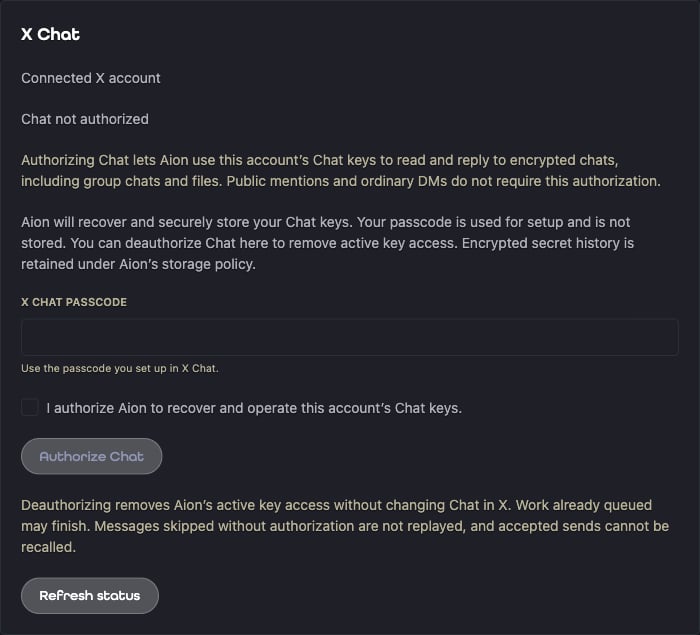
X Chat setup on the identity page, with an empty passcode field.
Deauthorize or restore Chat access
Select Deauthorize Chat on the identity page to remove Aion’s active access to the account’s Chat keys. This control leaves the X account’s conversations and Chat setup in X intact. It is also available when the status reads Chat reauthorization required, so you can remove retained keys without entering a passcode again. Encrypted secret history remains under Aion’s retention policy. Deauthorization is a logical deletion, not immediate physical erasure. If the status reports pending key cleanup, new Chat processing remains blocked. Refresh the status or retry Deauthorize Chat. You can authorize Chat again with consent and a fresh passcode submission. Work already queued may finish, including a brief in-flight send retry. Aion does not replay messages it skipped without authorization, and it cannot recall a send that X already accepted. Ifchat.received is selected but keys are unavailable, Aion records a safe warning and ignores the event.
Public mentions and ordinary DMs do not depend on Chat key readiness.
Provider permissions
The current OAuth setup requests the scopes below. Reauthorize an existing identity when it lacks a required scope. These X permissions are separate from Aion File Service access.Message Mapping
The inbound message uses the shared Distribution, Event, and Distribution/Messaging contracts. For Chat, the normalizedMessageEventPayload contains the sender, conversation, and signed message identifiers.
Its contextId is the canonical X conversation ID. One-to-one messages use direct-message trajectory.
Group messages use conversation trajectory. The source Data part contains safe event identifiers, without keys or
ciphertext.
Aion’s top-level A2A message.contextId also includes the identity and transport prefix.
Use the normalized payload’s contextId when a Twitter tool needs an X conversation ID.
Outbound responses use the shared SDK response precedence. See
LangGraph Message Mapping and
Google ADK Message Mapping.
The Chat reply target remains bound to the inbound conversation and connected identity.
Features
One-to-one and group chats
An eligible one-to-one message can trigger the agent without a mention. In a group, the message must contain a verified mention of the connected account’s current handle. A mention of another member, quoted content, and membership notices do not trigger the agent. Replies stay in the same group. Removal from the group stops further access through Aion. Chat events that carry only key or membership changes do not become user messages. Agents do not get tools to create groups, add members, remove members, or accept message requests in this release. Aion does not explicitly accept or decline a message request. The request-to-reply path still requires live provider validation.Incoming files and notices
Disabled, the default, omits encrypted Chat file content and adds anattachments-disabled notice.
File Service decrypts supported files and imports them into Aion’s protected File Service.
Successful files arrive as temporary File parts.
Chat files have a 20 MiB content limit, a ten-file limit per message,
and 72-hour retention. Access grants expire with that retention or sooner.
Supported formats include PNG, JPEG, GIF, WebP, MP4, Ogg/Opus, MP3, M4A, PDF, UTF-8 text, and JSON.
Chat audio does not receive automatic transcription.
If a file cannot be retrieved, decrypted, or stored, an attachment-processing-failed notice identifies the failed file
when its name is available. Eligible text and successful files still reach the agent.
Aion never supplies an empty File part for an omitted file.
An otherwise eligible attachment-only message still reaches the agent with event data and a notice, without a Text
or File part. The agent can choose to explain that it cannot process the attachment. Aion does not send that reply
automatically.
The group mention rule still applies to attachment-only messages.
Notices are Data parts in the original message. Their source identifies the issuing Distribution’s REST resource.
See NoticePayload for the shared schema and extension
declarations.
- LangGraph
- Google ADK
- A2A
Inspect notices in the complete inbox alongside the normalized event:
Recent conversation messages
The Aion Twitter MCP capability addsgetRecentChatMessages for a known conversation.
Pass the normalized messaging payload’s contextId as conversation_id:
meta.incomplete_history reports a partial result.
meta.unreadable_event_codes identifies skipped unreadable events without private diagnostics.
A result is not a complete archive or a guarantee of an unbroken conversation history.
History reads do not import attachments. They return attachments_omitted and notice objects instead.
Disabled attachment policy produces chat-attachments-disabled. Otherwise, the code is
chat-history-attachments-omitted.
The raw getChatConversationEvents tool still returns encrypted API data. It does not decrypt messages
through this managed tool.
No additional managed Chat agent tools are part of this release.
Replies and outbound files
An agent can return text and linked File parts in a message or artifact. Aion encrypts supported Chat files before upload. The same format and 20 MiB per-file limits apply. Up to ten files can accompany a response. Text and each file can require separate Chat messages. If a file fails, Aion can send a notice with that file name to the chat. The overall A2A response still fails, even if text or earlier files are already visible. An uncertain send stops further output to prevent a duplicate. Aion does not replace a failed encrypted Chat attachment with its source URL. See Media and attachments for ordinary DM and public-post limits.Delivery limits
Chat sends complete messages. Token streaming, cards, reaction actions, and group administration are not part of this path. Aion handles transient preparation failures with at most two further attempts, after 5 seconds and then 10 seconds. A failed earlier message can cause aprior-message-unavailable notice on the next eligible message.
Aion does not guarantee stream-gap recovery or replay of messages skipped while disconnected, disabled, or missing keys.