

Before you begin
You need:- an active Aion organization with Model Service access;
- enough Aion credits for the request.
Authentication
Choose credentials based on where the caller runs:Personal API key
Use a personal API key when calling the Model Service directly from a script, API client, or Codex. Open Settings > Personal > API Keys, create a key, and store it in your shell:Deployment client credentials
Aion deployments useAION_CLIENT_ID and AION_CLIENT_SECRET:
- Remote Deployment: Aion displays both values after you create the deployment. Copy them immediately and add them to the runtime’s environment. The client secret is shown only once and cannot be retrieved later.
- Aion GitHub: Aion injects both values into the hosted runtime environment automatically.
Permissions and attribution
Both authentication paths requiremodel.execute in the organization. A personal API key acts as its user.
Within an agent request, the SDK preserves its request-local attribution, including a forwarded usage-attribution
carrier. Outside a request, it sends no attribution header; Aion resolves the deployment’s current
Daemon Identity. An active request with missing attribution fails instead
of falling back to the daemon.
Before sending work to a model, Aion also checks the organization’s credit policy. Usage records contain the model,
token counts, Aion credits, result status, and responsible user or Identity. They do not contain the prompt or
generated response.
A failed or cancelled request can still use credits when the model reports consumed work.
Usage
Open Resources > Models and select a model. The Usage tab shows examples for its available operations. A model can have several output categories. A category describes its output, not the media that it accepts as input.
Video, Audio, and Other entries can appear as metadata. A category alone does not enable an invocation endpoint.
The model detail page explains when no operation is available. Chat model selectors continue to show text models only.
Choose a client
Use the Text client guide for SDKs, frameworks, and Codex. Use HTTP or the Python SDK example for Decisions. Use the image guide for JSON, SSE, and caller-owned image files.Make an HTTP request
See the Text request example or the Decisions request example.Use an SDK adapter
The Text SDK examples retain the existing adapter contracts.Configure Codex
See the Codex configuration for the Text Responses endpoint.Provider preferences and service tiers
Text requests support the existing provider preferences and service tiers. Decisions accepts a provider object but does not acceptservice_tier.
Provider preferences
See Text provider preferences.Service tiers
See Text service tiers.SDK examples
See the Text SDK examples with provider options.Browse model details and pricing
The Models list shows each model’s provider, prompt and completion price per million tokens, recent token usage, and invocation count. Search the catalog or filter it by category and recent use.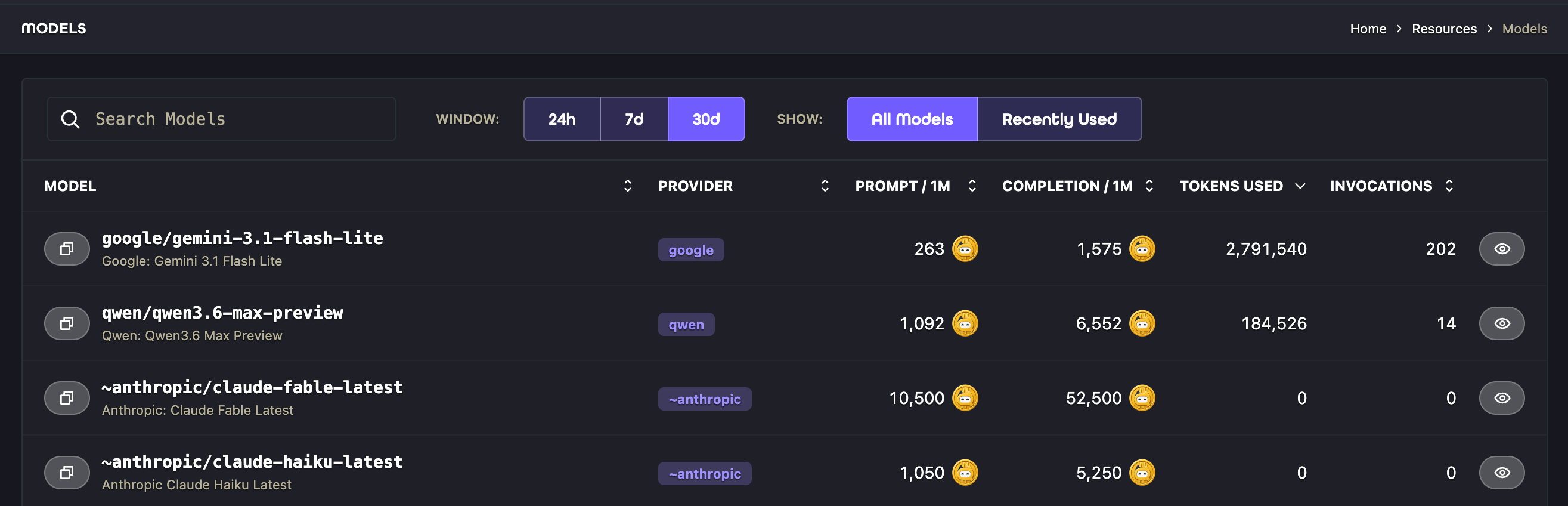
Monitor usage and cost
Select a model and open Metrics to inspect Invocations, Prompt Tokens, Completion, Total Cost, and Principal Attribution. Use the 24h, 7d, and 30d controls to change the reporting window.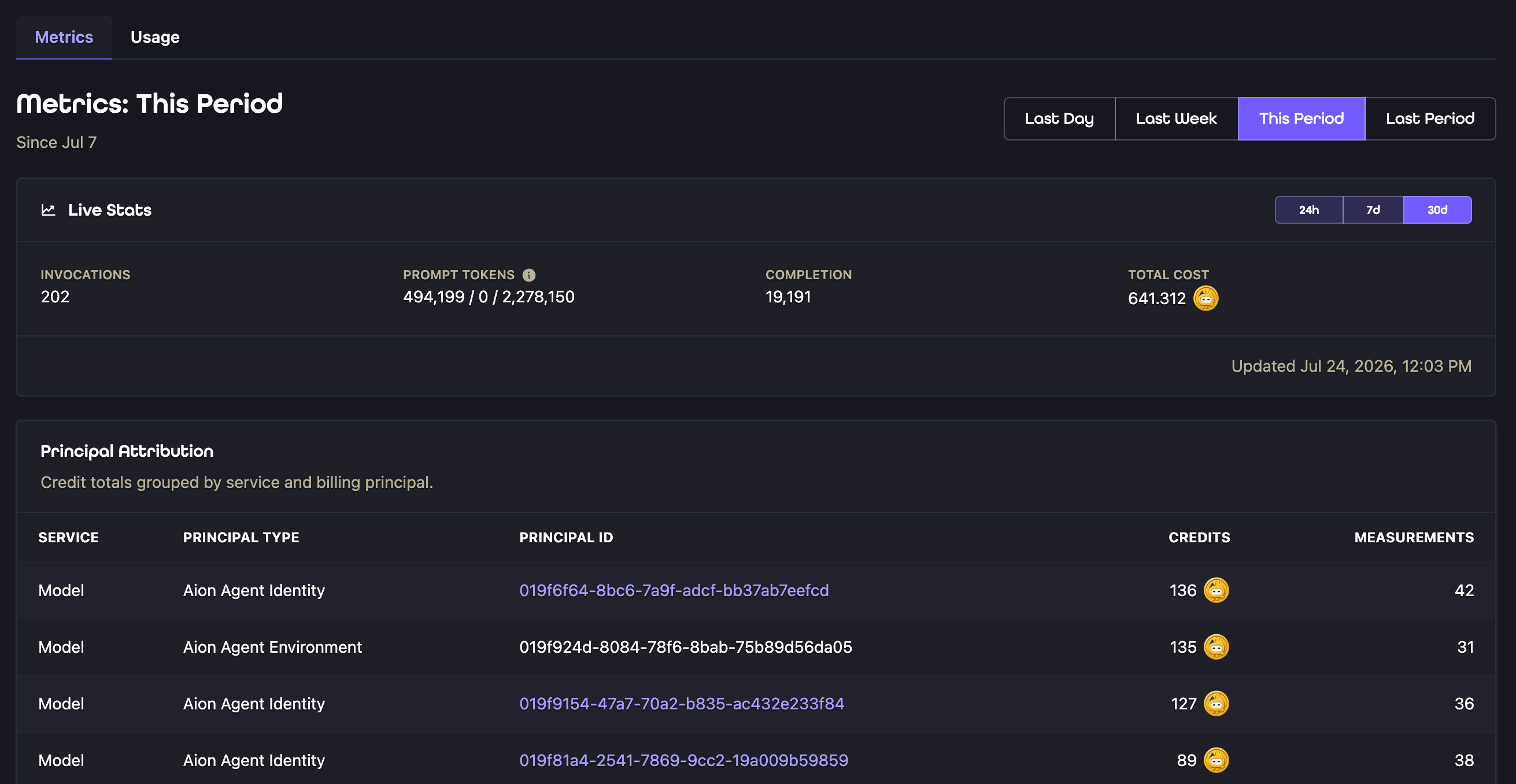
usage.cost when Aion can calculate a quote in Aion credits for the returned result.
Chat Completions, Responses, Decisions, and Images use this same convention. Fractional credits are valid.
The quote uses the applicable organization policy when Aion returns the response.
It does not include other billable attempts and is not a final settlement receipt.
Policy changes or later usage information can change the settled charge.
Metrics and billing records show settled charges in Aion credits.
Decisions responses can omit token counts. Token totals include only available counts and can be incomplete.
Invocation counts and settled Aion charges still apply. Missing cost information does not mean a request is free.
API behavior
Use
stream: true or send Accept: text/event-stream to stream either Text creation endpoint. The Responses endpoint
emits named events such as response.output_text.delta and response.completed. Chat Completions emits data frames
and ends with [DONE].
The Responses endpoint is intentionally stateless. Set store to false, include the full conversation context in
each request, and do not send stateful fields such as previous_response_id, conversation, or
background: true.
Troubleshoot a request
For Decisions errors, see Decisions failure behavior.
What to do next
- Define an
llmconfiguration field when deployers should select the model used by an application. - Use the LangGraph model adapter in a LangGraph application.
- Use the Google ADK model adapter in a Google ADK application.
- Review Identities to understand runtime permissions and usage attribution.